

Campus movie nights sometimes still run on paper tickets and a cash box at the door. That means a line down the sidewalk on a Friday, and a stack of receipts somebody in the business office matches up by hand on Monday. Moving those events onto a digital ticketing solution that is optimized for mobile fixes both ends: students get in faster, and every sale is recorded as it happens rather than counted afterward.
Students who have never carried cash are not going to start for a movie night. And when the ticket, the head count and the deposit live in three different places, nobody can answer a simple question about how the night went. Box Office, our ticketing and event management solution, handles both sides of that. Think about this as one long enrollment and engagement funnel that starts the first time a student looks at an event listing, which is a useful way to see a movie night even if that plan belongs to a different office.
Modernizing school event ticketing: what students expect now
Meeting Gen Z expectations
Students do not carry cash, and they do not print things. They expect a digital ticketing platform that lives on their phone, from browsing an event to walking through the door. A theater ticketing solution that makes a student walk to an office during business hours to collect a pass will lose that student. Live events generally made this move years ago, and mobile ticketing became the default well before campuses caught up.
A college ticketing platform that works on a phone is what a student now assumes, not a feature you announce. It also makes the night look run rather than improvised, starting with the first post about it. What it does not do is remove the door: plenty of people still buy on the spot, so it is worth reading how online and on-site sales actually split before you decide how many people to staff at the entrance.
Beyond the basic scan
Selling the ticket is the start, not the end. Real-time reporting means you know how a screening is selling while you can still do something about it, and you know the count before the doors open rather than after they close. That is the part a spreadsheet cannot keep up with, because it is out of date the moment somebody buys.
Getting people through the door faster
Real-time scanning with the Hometown Gate App
The door is where a good event goes wrong. Tearing tickets by hand builds a line, and the line lands on whichever volunteers you could find that night. The Hometown Gate App scans a digital ticket in seconds, so the line keeps moving through a sold-out screening or a festival crowd. Internet outage? No problem. The Gate App’s Offline Scanning mode allows you to keep scanning tickets confidently without any downtime. Staff we speak with describe downloading it and scanning at the door the same week, with no IT project in between.
Managing the pass list
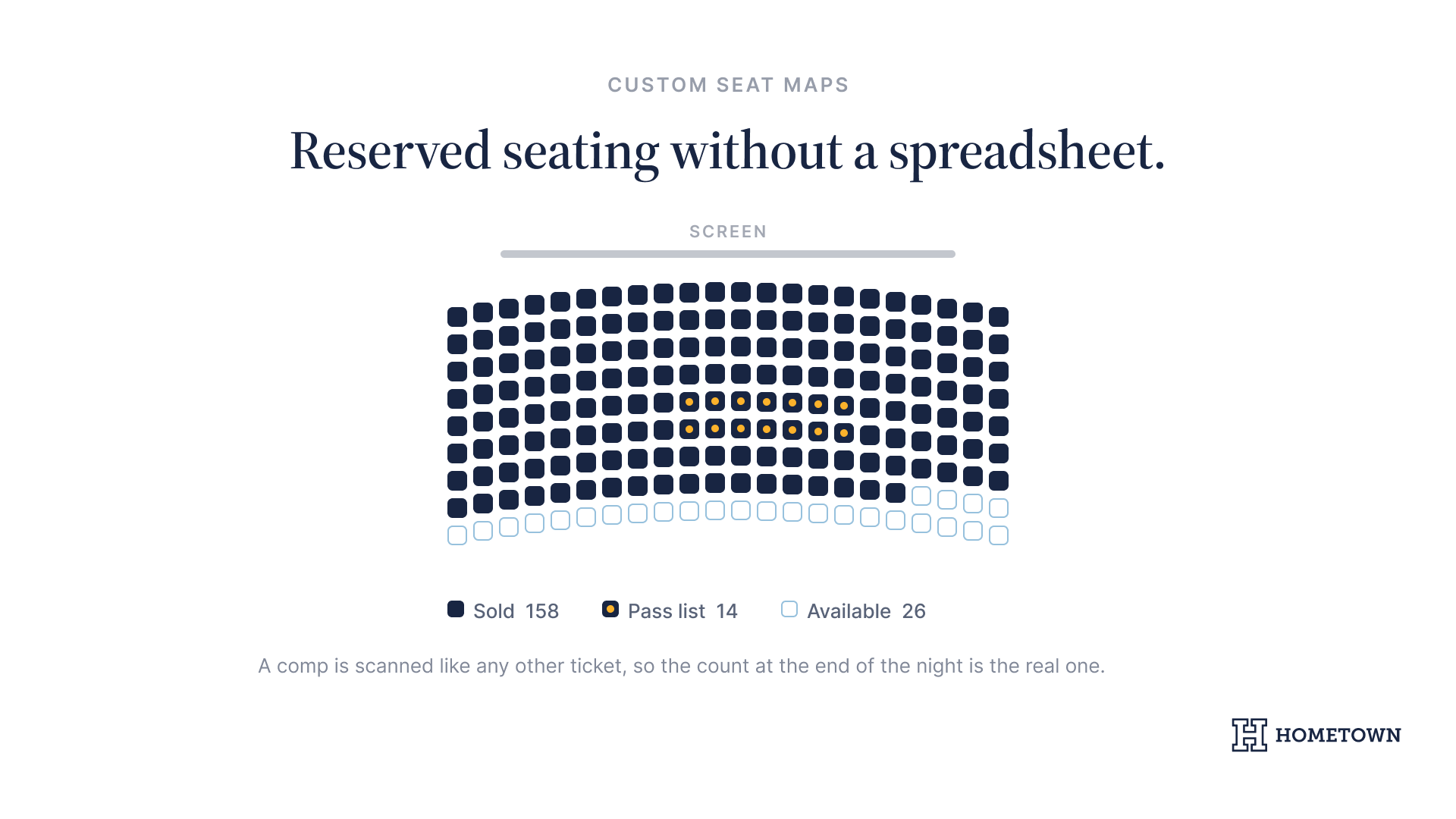
Faculty, student leaders, and guests turn into a free-for-all at the door when the list is on a clipboard. School ticketing software keeps that list digital, so a comp gets scanned like any other ticket and the count at the end of the night is the real one. For a run of events, season pass software sells the whole series up front instead of one night at a time.
Key features for gate management
- Real-time attendance tracking in the Gate App, so you know how many people are in the room without a headcount
- A digital pass list for faculty, student leaders, and guests, so a comp is scanned like any other ticket
- Offline scanning, so the line keeps moving through a wi-fi dead spot in the auditorium
- Print and mobile tickets, so a student with no signal at the door still gets in
What the business office gets
Reporting that is a byproduct, not a project
Your business office needs to know what came in and when. Real-time reporting covers every ticket sold, online or at the door, so the record is built while the night is happening instead of assembled from a cash box the following week. At year-end that turns a rebuild into an export.
Ask the money questions before you sign
Campuses have their own rules about who may hold funds, which payment processors are approved, and how money reaches a student activities account. Administrators we speak with describe those approvals as the slowest part of any change, slower than the software itself. Put those questions to any provider early, next to your questions about fees and contracts. Your treasurer will ask them eventually, so it is cheaper to ask first.
Professional branding for every event
Your event page is often the first thing a student sees, and a generic listing site makes a campus program look like an afterthought. Box Office sells tickets on your own site rather than sending students off to a third party, so the page carries your colors and your name from the first click through to the confirmation.
- Custom seat maps for a campus theater or auditorium, designed in-house at no cost, so reserved seating does not turn into a spreadsheet.
- Real-time sales reporting, so you can decide whether to add a second screening while there is still time to promote it.
- Event pages in your school's colors and logo, so the night looks like the institution put it on.
What to do next
- Look at your event calendar for the term and pick the two nights that draw the biggest crowd.
- Work with the Hometown team to get designed custom seat maps for your theater or auditorium so that you can provide reserved seating options.
- Ask your business office which approvals a new payment setup needs on your campus, and how long they take.
Other schools have already made this move, and the success stories are worth reading before you plan yours.
Book Demo to see what Box Office looks like on a campus movie night or for any upcoming student activity or event.
.png)

.png)